Every cold campaign lives or dies on one thing you build before you write a single email: the list. A great message sent to the wrong companies goes nowhere. A mediocre message sent to the right companies — real businesses that match your ideal customer profile (ICP), with a real contact attached — still books calls.
Yet "the list" is the part most people improvise: they buy a stale database dump or scrape a directory, blast whatever falls out, then blame the copywriting when outbound flops. Building a targeted B2B lead list is its own small engineering problem — and once you see the pipeline, it's obvious why the shortcut versions convert so badly. Here's the whole thing, end to end, with the real numbers.
Where these numbers come from: our own lead-generation pipeline has processed 10,000+ websites, identified 7,600+ real companies, and surfaced 50,000+ business contacts across more than a dozen industries. The ranges below are what we actually see.
What makes a lead list "good"
A prospecting list is only worth building if it's:
- Targeted — the companies match your ICP (niche + size + location), not just whatever ranked for a keyword.
- Real companies — actual business sites, not Yelp pages, listicles, or aggregators.
- Contactable — each row has a usable business email (ideally a verified email), or is honestly flagged as having none.
- Deduplicated — one row per company, not the same business three times.
- Honest — gaps are labeled, not faked. A fabricated email is worse than an empty cell.
Miss any of these and you don't have a lead list — you have a spreadsheet that looks like one until you hit send and your cold email lands in spam.
The pipeline in one picture
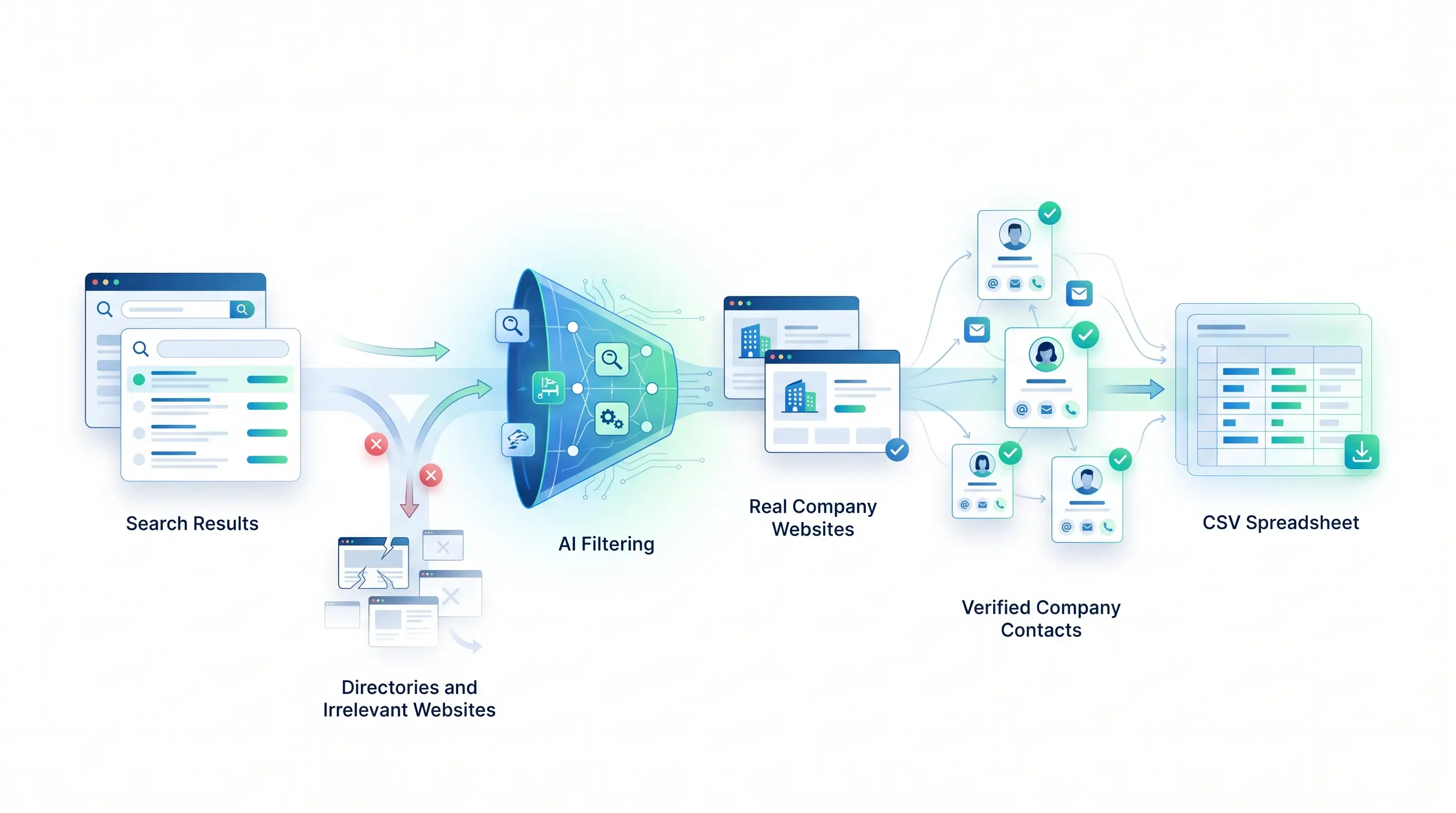
Whatever tool or service you use, building a targeted list is the same six stages — the only question is who does each one:
   Niche + Location  ("HVAC contractors in Austin")
          │
          ▼
      Search        → find candidate businesses across the web, at scale
          │
          ▼
   Filter to real   → keep company sites; drop directories, big brands
     companies
          │
          ▼
    Get contact     → crawl each site for its public, verified email
          │
          ▼
   Label + enrich   → role vs person, attach a name/title, add fields
          │
          ▼
     Clean CSV       → deduped, one honest row per company
The magic isn't any single stage — it's doing all six, without cutting the two everyone skips: filtering to real companies and cleaning honestly.
Step by step
1. Start from a niche and a location
The input isn't a keyword — it's an ideal customer: a business type plus the cities or regions you sell into. "Dental clinics in Denver." "Boutique law firms in the UK." That pairing is what makes the list targeted, and everything downstream inherits it.
2. Search the web at scale
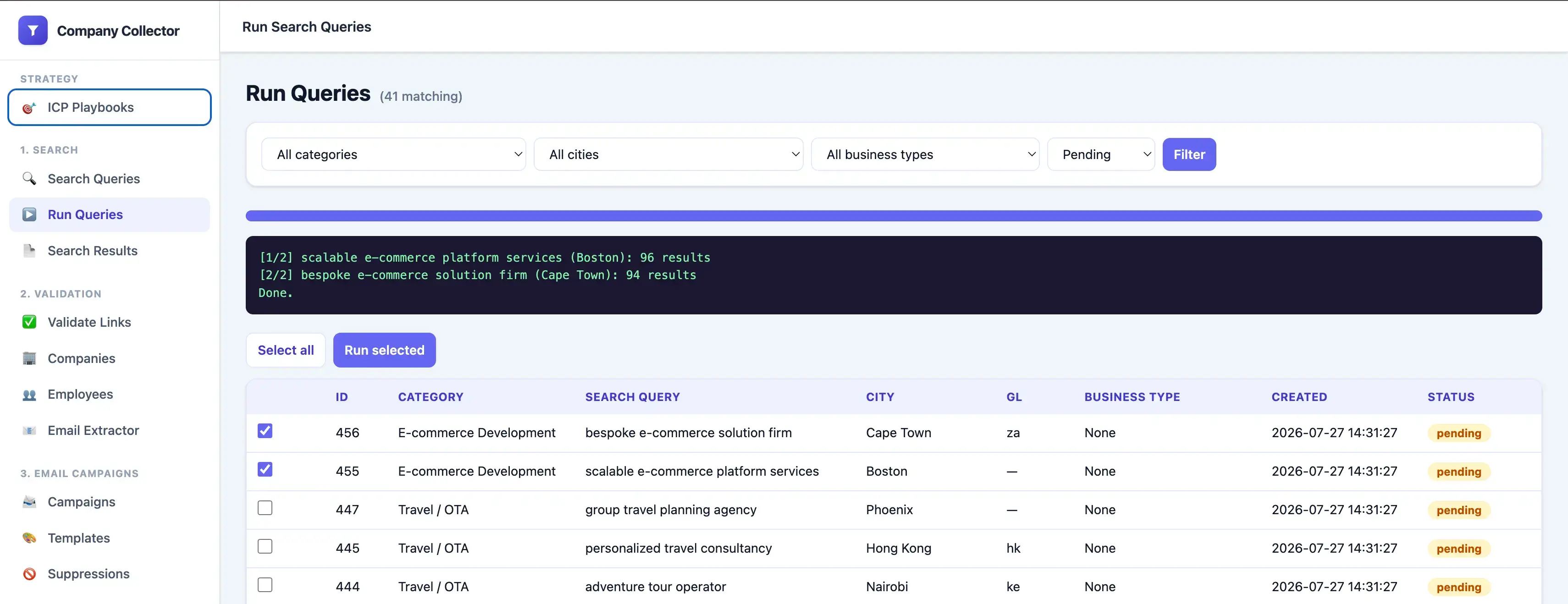
Turn the niche+location into queries and run them through a search API (we use Google via SerpApi), paginating several pages deep and collecting organic results plus local-pack businesses. A typical run returns 300–2,000 candidate companies.
One non-obvious trap: setting "location = Austin" only biases Google's ranking — it doesn't restrict results to businesses there, so you still get global directories. The fix is to put the city in the query text itself (and pass the country code). Small detail, huge difference in list quality.
3. Filter to real companies — the step that makes it a lead list
This is where most lists fall apart. A niche search returns a mess of non-prospects: directories (Yelp, Yellow Pages), listicles ("15 best HVAC companies in…"), review sites, and marketplaces. Email those and you're emailing nobody.
So every candidate gets classified before it's allowed on the list: is this a real company's own site (not a directory/aggregator)? Small local business or a giant brand that already has enterprise vendors and isn't worth a cold pitch? We run this with an LLM against the page text and a strict schema — in practice it resolves 90–95% of sites automatically. The payoff: actual prospects, not everything that ranked. Skipping this is the single biggest reason bought lists convert so badly.
4. Get the contact
Now that a row is a real company, crawl its site for the best public email: a real browser so JavaScript-rendered addresses appear, following contact/about/team pages, preferring mailto: links, and throwing out the garbage (tracking-pixel addresses, template placeholders) naive scrapers keep. Across real B2B niches, 70–90% of company sites publish at least one usable business email; the rest only offer a contact form, and get flagged honestly. (Full detail: how to extract emails from a list of websites — the core of our email extraction service.)
5. Label and enrich
Each address gets a type (role like info@/sales@ vs a likely person), and a name/title — only when it's genuinely on the page: jane.doe@ → Jane Doe, but aharris@ never becomes "A. Harris" by guesswork, and if the page doesn't name the person the field stays blank. Invented names are worse than none. Extra fields — phone, industry, size, location — come from a data enrichment pass, so the file drops straight into your CRM.
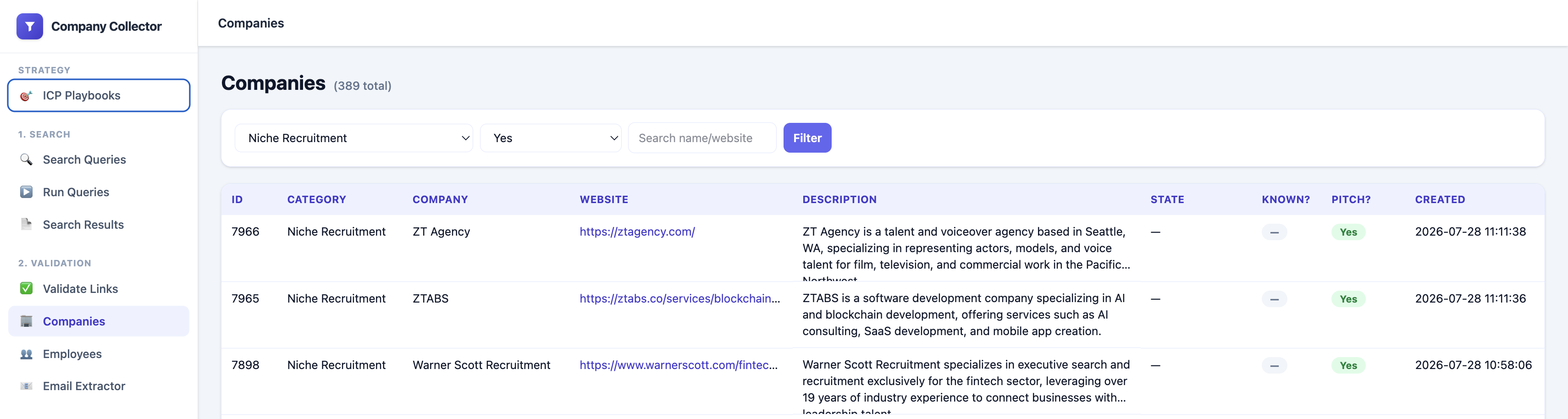
Each candidate classified into a real company with its contact, name, and fit — directories and big brands filtered out.
6. Deduplicate and clean
Collapse everything into one honest row per company — dedup by domain and address, keep the cleanest record, label the gaps. What comes out is a file you can actually send from.
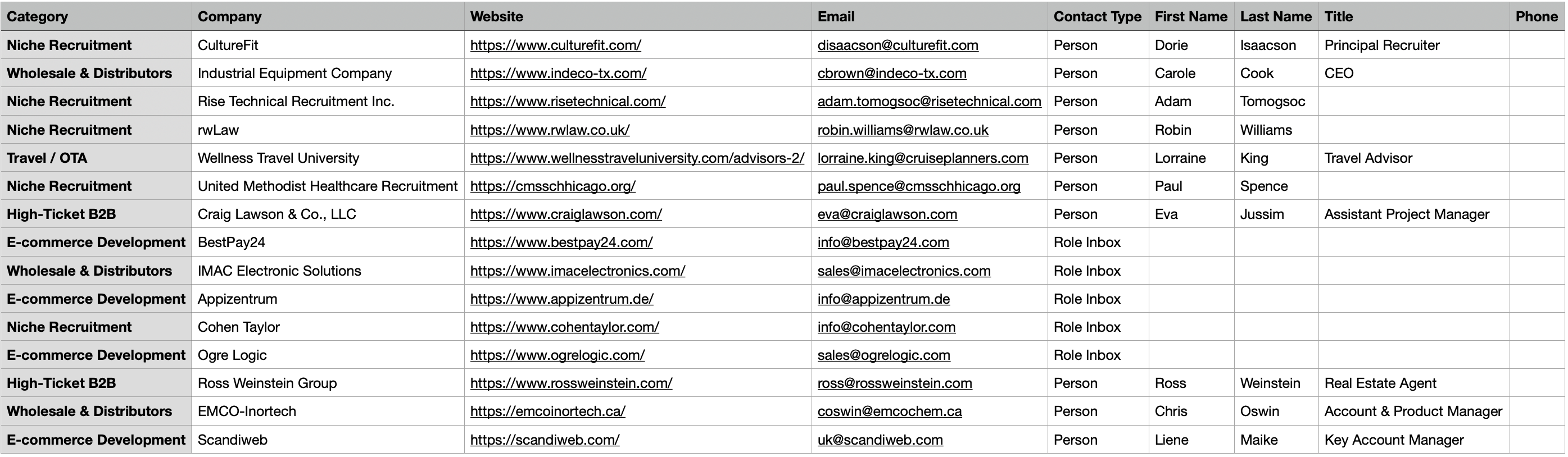
The finished list — one deduplicated, labeled row per company, exported straight to CSV.
Need this done for you? We build targeted business lead lists from scratch — niche and cities in, clean and verified companies out — and can prepare a free 25-company sample on your exact ICP. Start your list →
Common lead-list mistakes
Avoid these and you're ahead of most outbound teams:
- Scraping only Google Maps. Great starting source, but it rarely exposes an email — step two of six, not the whole job (see Google Maps scraping).
- Buying old databases. They go stale fast; you pay per credit for records verified months ago.
- Not removing directories. Leaving Yelp and listicle URLs in means a chunk of your "prospects" aren't companies.
- Using guessed emails. Pattern-guessed addresses and invented names bounce and burn your sending domain.
- Never verifying contacts. Extraction finds an address; it doesn't confirm the mailbox is alive. Skipping a verified email pass tanks deliverability.
Build it, buy it, or have it done
- Build it yourself. All six stages are doable if you code — but the hard, underrated parts are the filtering and cleaning, not the search call. Worth it if lead generation is a recurring core activity you'll maintain.
- Buy a database (ZoomInfo, Apollo). Fine for recurring self-serve lookups, but coverage is thin for small local businesses, data goes stale, and credits get expensive.
- Have it done for you. Hand over the niche and cities; get back a clean, deduplicated list of real companies with verified contacts, non-prospects flagged. Best when you want the result, not a data project.
This is what we do at Scrapels: give us the ICP and the places, and we run the whole web scraping and enrichment pipeline above.
Is it legal?
Collecting publicly published business information is generally fine; how you use it is where the rules live. Public business data only (no personal data, nothing behind a login), and follow the outreach laws — CAN-SPAM (US) and GDPR (EU): relevant B2B outreach, a real opt-out, honored unsubscribes. This isn't legal advice; if you email into the EU or operate at scale, talk to a lawyer.
FAQ
How is this different from scraping Google Maps or a directory? Scraping one source gets raw rows. Building a lead list adds the two stages that make it usable: filtering to real prospects and cleaning honestly. Maps is a great starting source — see our guide to scraping Google Maps — but it's one step of six.
How long does it take? For a defined niche and set of cities, a first batch is typically ready in 24–72 hours — most of that is crawling and verifying at a polite rate, not manual work.
How much does a B2B lead list cost? It scales with volume and enrichment fields, not a flat per-seat subscription — you pay for the list you need. We start every project with a free 25-company sample and quote from there.
Can you include phone numbers and target multiple cities? Yes to both — phone, industry, size, and location come from the data enrichment step, and the pipeline runs each niche across as many cities or countries as you specify, deduped across all of them.
Can you verify the emails? Extraction finds a clean address; verification confirms it's deliverable (syntax, MX, mailbox, catch-all flags). We can include a verified email pass so the list is send-ready.
Can I build a list of thousands of companies? Yes — the pipeline is the same for 100 or 100,000; it just needs proper pagination, rate limiting, and dedup. We handle large batches routinely.
What format do I get? CSV — it imports into Excel, Google Sheets, and every CRM and cold-email tool.
The bottom line
Outreach is the easy part. The list is where campaigns are won or lost — and a good one isn't a scrape, it's a pipeline: a niche and a location in, a clean file of real, contactable, deduplicated companies out. Judge it by the same bar every time: right companies, verified contacts, honest gaps.
Instead of buying another outdated database, start with a free sample built for your niche — real companies, verified contacts, and honest labeling, so you can judge the quality on your ICP before paying for anything. Get your free 25-company sample →